Part 3 of a five-part series on techno-fascism and the tools that push back against it. Part 1 covered the machinery of surveillance capitalism — real-time bidding, data brokers, and the incentives behind it. Part 2 looked at private messaging. This part covers browsing and search: what a browser and a search engine learn about you by default, and what changes that.
On 5 August 2020, a house fire in Denver’s Green Valley Ranch killed five members of a Senegalese immigrant family — two adults and three children. Investigators found no forensic evidence pointing to a suspect. Two months in, Denver police served Google with a “reverse keyword” warrant: rather than naming a suspect, it asked Google to identify every device that had searched for the house’s street address in the fifteen days before the fire. Google returned data on 61 searches from 8 accounts, along with IP addresses. A follow-up warrant unmasked five account holders by name, leading detectives to three teenagers — Kevin Bui, Gavin Seymour and Dillon Siebert — who had searched the address after Bui used Apple’s Find My feature to track a stolen phone to the wrong house. In October 2023 the Colorado Supreme Court ruled the warrant “constitutionally defective” for lacking individualised probable cause, but let the evidence stand under the good-faith exception. The majority added that “if dystopian problems emerge… the courts stand ready to hear argument”; the sole dissent, Justice Monica Marquez, wrote that the ruling gave “constitutional cover to law enforcement seeking unprecedented access to the private lives of individuals.”
The mechanism that made this possible is not exotic. Google keeps a record of who searched for what, tied to an account or an IP address, because that record is also the product it sells to advertisers. A keyword warrant does not need a suspect — it needs a search engine willing to run the query backwards across everyone. The Electronic Frontier Foundation has tracked reverse keyword warrants used in bombing investigations, a political assassination in Brazil, and — its stated concern — searches for abortion medication, gender-affirming care or drug information, where the warrant sweeps in anyone who searched the term for any reason. Search history is compellable precisely because it is retained, and it is retained because retention is the business.
Search engines
Most “private” search engines fall into one of two categories: an independent index, built by their own crawler, or a front-end that queries someone else’s index (usually Google’s or Bing’s) and strips identifying data before forwarding the query.
- DuckDuckGo is a front-end, drawing results mainly from Bing under a search syndication agreement, and states it does not log IP addresses or store search history tied to an identity. In May 2022, researcher Zach Edwards found that DuckDuckGo’s tracker-blocking browser and extensions carved out an exception for Microsoft’s own trackers on third-party sites — a term of that same Bing agreement. CEO Gabriel Weinberg confirmed the restriction and, after the story spread, announced Microsoft had agreed to drop it; DuckDuckGo shipped Microsoft-tracker blocking that August.
- Startpage proxies Google’s index — you get Google’s results without a Google account attached to the query. Since 2019, a majority stake in its parent company has been held by System1, a US advertising-technology firm, via a subsidiary called Privacy One Group. Startpage says its privacy policy and infrastructure remain unchanged under that ownership; the arrangement is disclosed, but it means the company built to keep your queries away from an ad-tech business is partly owned by one.
- Brave Search runs its own independent index — not a Google or Bing proxy — built from a combination of its own crawler and the opt-in Web Discovery Project, where consenting Brave browser users anonymously contribute signals about page quality. Brave states it does not collect IP addresses from Search users by default, and by August 2023 had built its own image and video index, ending its last dependency on Bing.
- Mojeek, based in the UK, has run its own crawler and index — no reliance on Google or Bing — for over 15 years, and states it does not track users or build profiles. Its index is smaller and its long-tail coverage weaker than Google’s, a direct trade-off of not aggregating other engines’ results.
- SearXNG takes a different approach entirely: it is self-hosted metasearch software that queries other engines — Google, Bing, Brave, and up to 279 other configured services — on your behalf, strips tracking parameters from the results, and keeps no logs, because you run the instance yourself (or use one of roughly 70 public instances at searx.space, each with its own trust model). It has no index of its own; it borrows everyone else’s and never tells them who’s asking.
| Engine | Index | Query logging | Ownership |
|---|---|---|---|
| DuckDuckGo | Bing-sourced (proxy) | States no IP or identity logging | Independent (DuckDuckGo, Inc.) |
| Startpage | Google-sourced (proxy) | States no IP or identity logging | Majority-owned by System1 (ad-tech) since 2019 |
| Brave Search | Independent | States no IP logging by default | Brave Software |
| Mojeek | Independent | States no tracking or profiling | Independent (Mojeek Ltd, UK) |
| SearXNG | None — aggregates others | No logs on your own instance | Open source; you run it, or trust a public host |
Browser fingerprinting
Blocking cookies does not stop a site from recognising you. A browser exposes dozens of small, individually harmless-looking properties — screen resolution, installed fonts, timezone, GPU model, how it renders a hidden image — and combined, they form a fingerprint that is often unique without a single cookie involved. Cookies can be deleted; a fingerprint regenerates itself the moment you reload the page.
The best-documented technique is canvas fingerprinting: a script draws hidden text or shapes to an invisible HTML5 canvas element, reads the rendered pixels back out with toDataURL(), and hashes them. Font rendering, anti-aliasing and GPU drivers vary just enough between machines that the hash differs from device to device, while staying stable across repeat visits to the same machine. In 2016, Princeton researchers Steven Englehardt and Arvind Narayanan crawled the top 1 million sites with an instrumented browser and found canvas fingerprinting on 14,371 sites (1.6%), almost all (98.2%) loaded via roughly 3,500 third-party script URLs hosted on about 400 domains — a handful of tracking companies embedded nearly everywhere. The same study identified canvas font fingerprinting (using the canvas text-measurement API to enumerate installed fonts) for the first time at scale, present on 3,250 sites and reaching 2.5% of the top 1,000; WebRTC-based fingerprinting, which abuses the peer-to-peer API to leak a device’s local network IP address even behind a VPN, on 715 sites; and early use of the AudioContext and Battery Status APIs for the same purpose. Separately, research cited in that paper — Peter Eckersley’s original 2010 Panopticlick study and a 2016 follow-up by Laperdrix, Rudametkin and Baudry — found 80–90% of desktop browsers and 81% of mobile browsers tested carried a unique fingerprint from browser properties alone, no cookies required. The EFF’s successor tool, Cover Your Tracks, still runs the same class of test today and reports how many other tested browsers share your exact configuration.
One further finding from that 2016 study is worth sitting with: existing ad-blocking tools of the day (Ghostery, and the EasyList/EasyPrivacy filter lists) blocked the well-known fingerprinting domains on 80–90% of the sites carrying them, but caught only 8–25% of the underlying scripts. Blocklists work by recognising known trackers; fingerprinting scripts that are new, obscure or self-hosted by the site itself sail straight through. A blocklist can only stop what someone has already catalogued.
Defences
Blocklists reduce fingerprinting exposure; they do not close it. Two structurally different strategies do better, and browsers built for privacy pick one or the other.
Uniformity is the Tor Browser strategy: rather than trying to hide or randomise your fingerprint, every Tor Browser user is engineered to present the same fingerprint. The user agent reports a standardised OS regardless of the real one (Windows users appear as Windows 10, macOS as OS X 10.15, Linux/BSD as generic “Linux X11”), canvas image extraction is blocked outright, and window dimensions are forced into fixed 200×100 pixel buckets with grey bars filling the rest — a technique called letterboxing. The aim is not invisibility but anonymity in a crowd: if every Tor Browser user looks identical, a fingerprint stops being useful for singling anyone out. Mullvad Browser, built jointly by Mullvad and the Tor Project, applies the same uniformity techniques and letterboxing without routing through the Tor network — pair it with a VPN (Mullvad’s own or another) to also hide your IP address, since the browser alone does not.
Firefox’s built-in privacy.resistFingerprinting setting applies a version of the same approach to a mainstream browser, but it is not the default, and the popular arkenfox hardening configuration stopped enabling it by default in recent versions — the project’s own reasoning is that if you need that level of protection, Mullvad Browser already provides it without the compatibility breakage resistFingerprinting causes on ordinary Firefox. Chromium-based browsers, including Chrome and Brave in their default configuration, do not attempt fingerprint uniformity at all.
| Browser | Strategy | Network anonymity | Trade-off |
|---|---|---|---|
| Tor Browser | Uniform fingerprint across all users, letterboxing | Routes through Tor by default | Slower; some sites block Tor exit nodes |
| Mullvad Browser | Same uniformity techniques as Tor Browser | None built in — needs a separate VPN | Letterboxing and blocked canvas break some sites |
| Firefox + arkenfox | Configurable; resistFingerprinting off by default as of recent versions | None built in | Manual tuning required for meaningful protection |
| Chrome / Brave (default) | No fingerprint uniformity | None built in | Full site compatibility, no fingerprint defence |
Third-party cookies
Chrome announced in 2020 that it would phase out third-party cookies — the mechanism that lets an ad network recognise you across unrelated sites — and spent years building “Privacy Sandbox” APIs to replace that tracking capability with something narrower. In July 2024, Google reversed course: rather than removing third-party cookies, it proposed a standalone prompt letting users choose whether to allow them. By April 2025, Google confirmed it would not ship that prompt either, and would leave Chrome’s existing cookie controls as they are. Most of the Privacy Sandbox APIs themselves were shut down in October 2025. Third-party cookies remain fully functional in Chrome by default, which — given Chrome’s browser market share — means the mechanism underpinning most of the ad-tracking economy described in Part 1 was never switched off.
Google’s one shipped privacy change from that effort is IP Protection, a two-hop proxy that hides a user’s IP address from third-party sites while browsing in Incognito mode, routed through one Google-operated hop and one external CDN hop so neither party sees both the user’s IP and their destination. It began a limited, opt-in rollout in North America in mid-2025 and is not yet broadly available.
DNS
Before your browser can load a site, it has to resolve the domain name to an IP address — a DNS query. Run without encryption, that query travels in plain text to whichever resolver your device is configured to use, almost always your ISP’s by default. Every domain you visit is legible to anyone who can see that traffic: your ISP, and anyone monitoring the network between you and the resolver. DNS-based content filtering is now a standard tool of state censorship and content blocking across the EU, UK, Australia and elsewhere, and some ISPs monetise query logs by selling them on.
DNS over HTTPS (DoH) and DNS over TLS (DoT) encrypt the query between your device and the resolver, so your ISP can no longer read it directly — though the resolver you’ve chosen still can, which is why the choice of resolver matters. Privacy Guides recommends Quad9, a Swiss non-profit resolver that states it does not log IP addresses and blocks known malware and phishing domains by combining threat feeds from over 20 partners; Cloudflare, which commits to deleting identifying query data within 25 hours; and NextDNS, which offers per-device filtering and analytics but has logging and insights enabled by default, a trade-off worth turning off deliberately if you want the privacy-first setting. Encrypting DNS closes one leak, not the whole picture — the same guide is blunt that “encrypted DNS will not help you hide any of your browsing activity” from a site or network operator who can see the connection itself. That’s because even with encrypted DNS, the TLS handshake that follows still names the destination.
When your browser connects to a site over HTTPS, the very first unencrypted message it sends — the TLS ClientHello — includes the domain name in a field called Server Name Indication (SNI), so the server knows which of potentially many sites on that IP address you want. Anyone watching the connection can read the SNI field even when the DNS query itself was encrypted, which is why domain names remained visible to network observers for years after DoH became common.
Encrypted Client Hello (ECH) closes that gap by encrypting the ClientHello, including the real SNI, using a public key fetched over DNS beforehand. Firefox made ECH available by default starting with version 119 in October 2023; Chrome has shipped support too. Server-side, deployment is essentially one company: Cloudflare, and even there roughly a third of its servers don’t advertise it. ECH replaces the plaintext hostname with a generic “public name” so an observer sees only that you connected to, say, cloudflare-ech.com — but that placeholder value is itself a fixed, recognisable string, which is exactly what let Russian censors act on it. On 5 November 2024, Roskomnadzor’s deep-packet-inspection systems began blocking any TLS connection whose ClientHello contained an ECH extension paired with that public-name SNI, cutting off every site behind Cloudflare’s ECH deployment at once — including ordinary, non-political sites like SteamDB and an agricultural academy’s website, alongside whatever had prompted the block in the first place. The standard built to hide one hostname introduced a new, more conspicuous one.
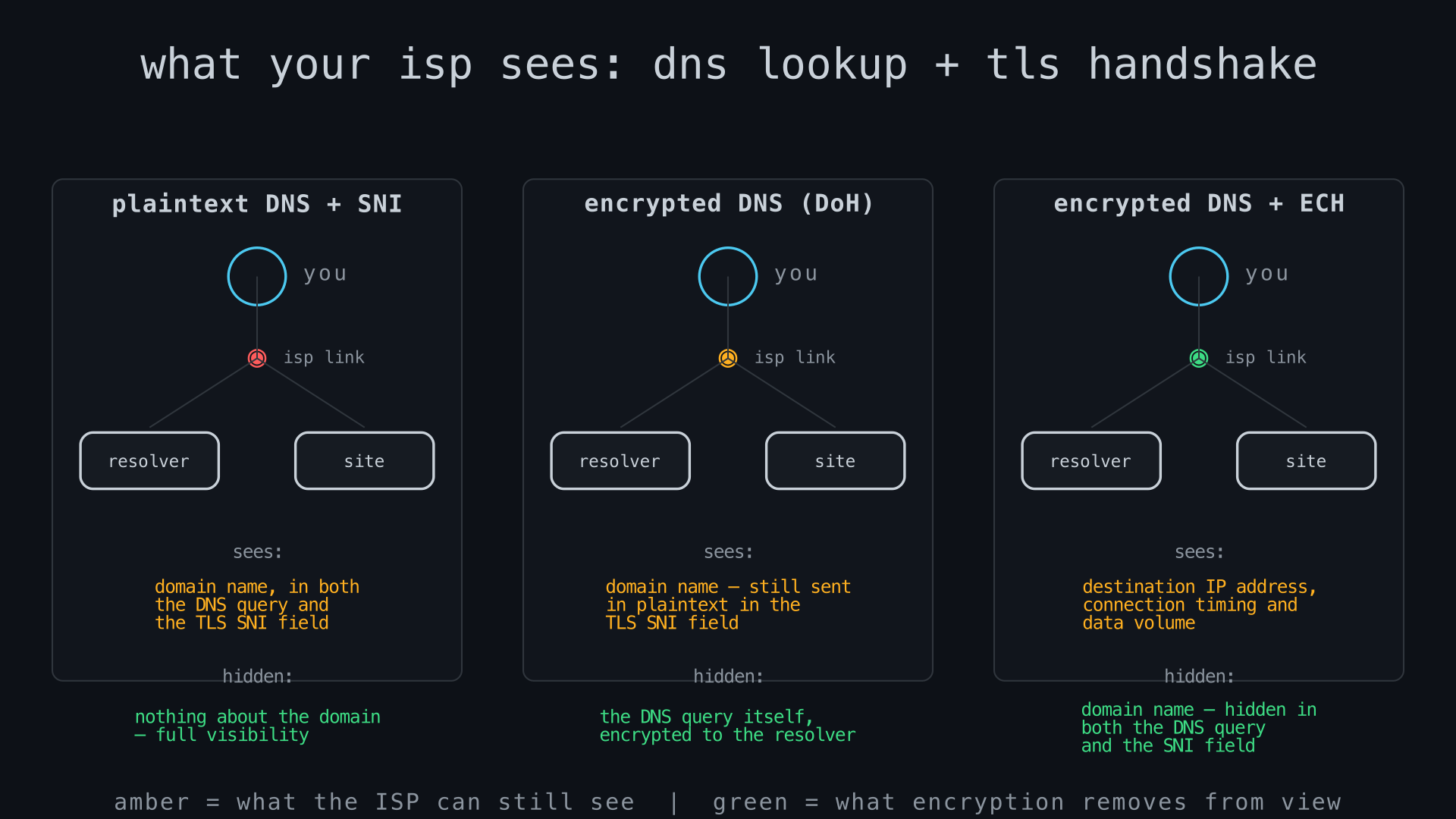
You can check whether your own connection is using ECH at Cloudflare’s own test page, cloudflare-ech.com, which reports back whether the request that reached it arrived with ECH active.
Global Privacy Control
Global Privacy Control (GPC) is a browser signal, on by default in Brave and in DuckDuckGo’s browser and tracker-blocking extension, and available in Firefox by enabling it manually in settings, that tells every site you visit “do not sell or share my personal information,” automatically, without visiting each site’s individual opt-out page. In California, it isn’t just a request: under the California Consumer Privacy Act, businesses are legally required to honour a GPC signal as a valid opt-out, and enforcement action has already been taken against companies that ignored it. A further law, the Opt Me Out Act (AB 566), will require every browser sold or used in California — Chrome, Safari and Edge included — to build in its own opt-out signal by 1 January 2027, rather than leaving it to individual browsers or extensions to volunteer the feature. Outside jurisdictions with a legal mandate to honour it, GPC is only as effective as a site’s willingness to comply voluntarily.
Building a private setup
None of this requires switching everything at once. In rough order of effort:
- Switch search engines. Brave Search or Mojeek for an independent index with no tracking; DuckDuckGo if relevance matters more and a Bing-sourced proxy is an acceptable trade-off; a self-hosted SearXNG instance if you don’t want to trust any single provider with your queries at all.
- Turn on encrypted DNS. In Firefox: Settings → Privacy & Security → DNS over HTTPS, and choose a resolver (Quad9 or NextDNS with logging switched off, rather than the default). In Chrome: Settings → Privacy and security → Security → “Use secure DNS,” same choice of resolver.
- Confirm ECH is active by visiting cloudflare-ech.com in a current version of Firefox or Chrome.
- Pick a browser matched to your threat model. Mullvad Browser plus a VPN, or Tor Browser, for meaningful fingerprint resistance; Firefox with deliberately configured settings as a middle ground; default Chrome or Brave if convenience and site compatibility matter more than fingerprint defence.
Limitations
None of this makes you anonymous on its own. Fingerprint uniformity only works if enough other people use the same browser configuration — a rarely used setting that “resists fingerprinting” can itself become a fingerprint. Encrypted DNS and ECH hide the domain name from your ISP, but the destination IP address, connection timing and data volume remain visible to anyone watching the wire; a sufficiently motivated observer with access to network taps and a list of which IPs host which sites can often infer the destination anyway. ECH depends on server-side deployment that is currently concentrated in one company, and a censor with the will to block ECH outright (as Russia did) can do so, trading a privacy gain for renewed unavailability. Independent search indexes are smaller than Google’s and weaker on long-tail queries; the search-privacy trade-off is real, not merely a matter of getting used to a different interface. Global Privacy Control has legal force only in the jurisdictions that have written it into law. And a search engine or browser that doesn’t log your queries still can’t stop the destination site itself from fingerprinting, cookie-tracking or otherwise identifying you once you arrive — this article’s defences apply to the trip there, not to what happens after you land.
Sources
- EFF — “Colorado Supreme Court Upholds Keyword Search Warrant” (October 2023)
- FireRescue1 — “Colo. court upholds Google keyword search warrant in fatal arson”
- TechCrunch — “DuckDuckGo removes carve-out for Microsoft tracking scripts” (August 2022)
- Brave — “What is the Web Discovery Project?”
- Mojeek — About
- SearXNG documentation
- Englehardt & Narayanan — “Online Tracking: A 1-million-site Measurement and Analysis” (ACM CCS 2016)
- EFF — Cover Your Tracks
- Tor Project — “Browser Fingerprinting”
- arkenfox user.js — Issue #889, resistFingerprinting default change
- Google Privacy Sandbox — “A new path for Privacy Sandbox on the web” (April 2025)
- Privacy Guides — DNS Resolvers
- Mozilla — Firefox 119.0 release notes
- Niklas Niere — “Russia Censors the Encrypted Client Hello (ECH)” (November 2024)
- California Privacy Protection Agency — “California’s Opt Me Out Act” (January 2026)