In May 2019, someone placed a WhatsApp call to the phone of a human rights lawyer in the United Kingdom. The lawyer did not answer — did not need to, and never saw the call — but the phone was compromised anyway. The call carried a crafted stream of packets that exploited a flaw in WhatsApp’s voice-call code (CVE-2019-3568), and within moments NSO Group’s Pegasus spyware was running on the device, able to read messages, follow the phone’s location and switch on the microphone. Meta later identified roughly 1,400 people hit by the same campaign — human rights lawyers, journalists and diplomats, with 456 targets in Mexico alone — and won a lawsuit against NSO over it, with a California jury ordering the company to pay damages in 2025.
The bug behind that attack was a memory-corruption flaw in an app’s code, which is the single most common way phones are taken over from a distance. GrapheneOS is a hardened, open-source rebuild of Android built to make that class of attack much harder, and to strip Google’s privileged access out of the operating system. It runs only on Google Pixel phones today, ships no data back to its makers, and treats every app — including Google’s own — as untrusted until it earns specific, revocable permissions. Edward Snowden named it as the base operating system he’d choose back in 2019, and by April 2026 the project’s own update-server figures — its only usage signal, since it collects none from users’ phones — put its active user base at roughly 400,000.
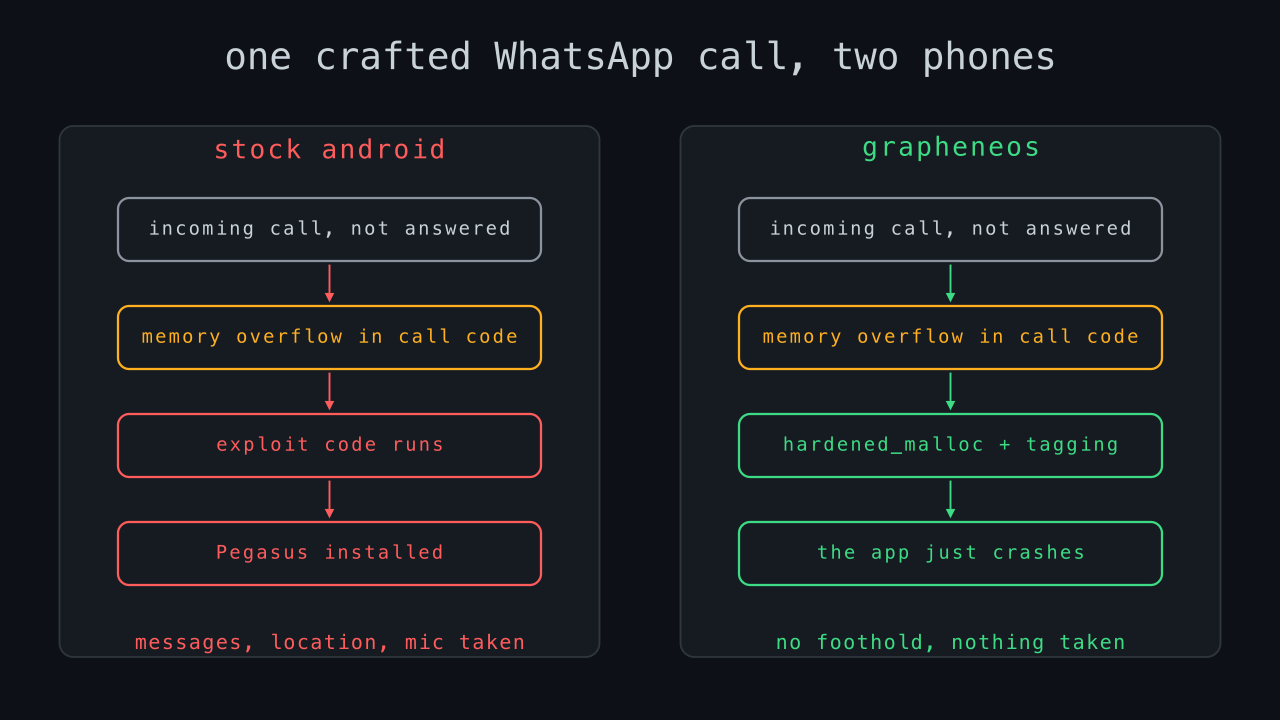
The exploit ran inside WhatsApp’s own code, and on GrapheneOS every app’s memory is managed by hardened_malloc, a replacement allocator designed to catch exactly this kind of corruption. On a Pixel 8 or later, hardware memory tagging adds a second check that turns most overflows of this type into an immediate crash rather than a usable foothold for the attacker. There is a further benefit: an exploit that crashes instead of running quietly gives itself away, and the resulting crash reports point the flaw out to the people who can fix it, shortening the time the underlying vulnerability stays useful.
None of this is a guarantee, and it would be a disservice to present it as one. These defences raise the cost and lower the reliability of memory-corruption attacks rather than making them impossible; a well-resourced attacker can rebuild an exploit around a specific protection; and hardware memory tagging exists only on the Pixel 8 and newer. What they change is the starting position — from a phone taken over in silence by one unanswered call, to a phone that forces the attacker to defeat real defences first, and to do it noisily if they fail. For the lawyers and journalists in that WhatsApp campaign, that is the difference that would have mattered. The rest of this article is what GrapheneOS protects against, what an ordinary phone is doing instead, and what switching to it costs you.
Who runs it
GrapheneOS’s userbase splits into two overlapping groups: people whose job creates a specific, named threat — a hostile government, a criminal organisation, a jealous ex-employer with legal resources — and people who understand the mechanism of surveillance capitalism well enough to opt out of it on principle. Investigative journalists working sensitive sources, human rights defenders and activists operating in or reporting on authoritarian states, and security researchers who need a phone they can trust not to leak their own research are the recurring named categories in project discussion and independent coverage. Snowden’s endorsement sits in the same bracket: a person whose stated adversary is a national intelligence apparatus, choosing the OS he’d trust his own phone to.
None of this makes GrapheneOS a niche tool reserved for people under active threat. The project markets itself, correctly, as a phone that does everything a normal Android phone does — banking, messaging, maps, most apps from the Play Store — with a materially smaller attack surface and a vendor that isn’t also an advertising company. The calculus for an ordinary reader is less dramatic than “protect me from a state actor” and more “stop the manufacturer of my phone’s operating system from also being the company monetising everything I do on it.”
What a stock phone sends
The most-cited independent measurement of this is Professor Doug Leith’s 2021 study at Trinity College Dublin, Mobile Handset Privacy: Measuring the Data iOS and Android Send to Apple and Google. Leith instrumented a Pixel and an iPhone running stock software and logged exactly what left each device at startup, at idle, and during ordinary use like opening Settings or inserting a SIM. The Pixel sent around 1MB to Google in its first ten minutes running, against 42KB from the iPhone to Apple — roughly 20 times more. At idle, the Pixel kept sending about 1MB to Google every 12 hours against 52KB from the iPhone to Apple, both devices phoning home on a cycle of roughly every four and a half minutes. Critically, this collection continued after the user had explicitly opted out of it in settings, and continued on a device that had never been signed into a Google account.
A follow-up study by the same researcher, published in March 2025, found that Google Play Services and the Play Store begin storing tracking cookies and a persistent Android ID the moment a Pixel is activated — before any app is opened, before any consent screen is shown, and the identifiers survive a factory reset. Leith’s assessment was blunt: no consent is sought for storing this data, and there is no opt-out. Google’s response, on the record to Forbes, was that it disagreed with the legal analysis without disputing the technical findings.
The mechanism underneath both studies is the same, and it’s worth naming precisely rather than gesturing at it: on stock Android, Google Play Services doesn’t run as an ordinary app. It’s installed with a system-level UID and a platform signature, which lets it read other apps’ logs, bypass the per-app firewall rules a user sets, and access data and APIs a third-party app with the same stated permissions could never reach. It is, in effect, part of the operating system rather than a guest running on it — which is exactly the design choice GrapheneOS reverses.
The same code, running in the same place, is treated completely differently by the two systems:
| Can Google Play Services… | Stock Android | GrapheneOS |
|---|---|---|
| read other apps’ logs | Yes | No |
| reach other apps’ storage | Yes | No |
| ignore the per-app firewall rules you set | Yes | No |
| run even after you deny it network access | Yes | No — the toggle applies to it like any app |
| use APIs reserved for the operating system | Yes | No |
That difference is the whole design in miniature: nearly everything else GrapheneOS does follows from refusing to trust code just because Google shipped it.
What GrapheneOS changes
Sandboxed Google Play
Most people switching off stock Android still want some Play Store apps to work. GrapheneOS’s answer, per its own features documentation, is to let users install Play Services as an ordinary, optional app with no special OS privileges, subject to the same sandbox, and the same per-app network, location, contacts and storage permission toggles as any other app. It can no longer read your other apps’ logs or storage, and a network permission toggle can cut it off from the internet entirely while everything else on the phone keeps working.
Hardened memory allocator
Android’s standard C library allocator is a common target for memory-corruption exploits: use-after-free and heap-overflow bugs in a codec, a font parser or a chat app’s media handler are a large share of real-world mobile exploit chains. GrapheneOS replaces it with hardened_malloc, which keeps allocation metadata out-of-line from the data it describes, randomises where allocations land, zeroes memory on free, and delays address-space reuse through quarantine so a freed pointer can’t be immediately reallocated and abused. On devices with ARM’s Memory Tagging Extension (Pixel 8 and later), it adds hardware tag checks that turn a large class of use-after-free bugs into an instant crash instead of a foothold the attacker can build on.
Storage scopes and contact scopes
Standard Android storage permission is close to all-or-nothing: an app that can read “photos and media” can generally read all of it. Storage scopes let a user grant an app access to specific files or folders instead of the whole library, and contact scopes do the same for the address book — by default an app sees an empty contact list until it’s handed individual contacts or groups. A flashlight app or a PDF reader that asks for full media and contacts access, which happens constantly on stock Android, simply doesn’t get it.
Network and sensor permission toggles
A per-app network permission toggle can deny an app internet access entirely, including on-device connections, while the app itself keeps functioning normally rather than crashing — the phone just reports the network as unreachable. A parallel sensors toggle blocks accelerometer, gyroscope, compass and barometer data (sensors that have been used in published research to infer typed PINs and conversation content without a microphone permission), returning zeroed data instead and notifying the user when an app tries.
Verified boot and exploit hardening
GrapheneOS extends Android’s verified boot chain and adds compiler-level hardening across the OS: control-flow integrity, Pointer Authentication and Branch Target Identification on ARMv9 hardware, stack protectors, and zero-initialisation of variables that would otherwise start with attacker-influenced garbage. Just-in-time compilation — a common vector for browser and app exploits because it generates and executes code at runtime — is disabled by default across the OS, including in GrapheneOS’s own hardened Chromium build, Vanadium.
Auto-reboot and a duress PIN
A locked device reboots itself automatically after a configurable window (18 hours by default), which returns storage to its strongest, pre-first-unlock encryption state — relevant if a phone is seized and left locked rather than actively worked on. A separate duress PIN, entered at the lock screen instead of the real one, triggers an irreversible wipe of the device and any installed eSIMs.
What you give up
None of this is free, and the project is unusually upfront about the trade-offs.
Banking apps. Compatibility is inconsistent and bank-specific, and the deciding factor is almost always Android’s Play Integrity API rather than GrapheneOS itself. Apps that only check basicIntegrity tend to work once Google Play is installed in its sandbox; apps that demand a full ctsProfileMatch attestation — proof the OS is an unmodified, Google-certified build — will refuse to run on any de-Googled or custom OS, GrapheneOS included, because sandboxed Play cannot produce that attestation. Community-maintained compatibility lists exist on the GrapheneOS forum and third-party trackers, and they’re worth checking against your specific bank before switching, not after.
NFC tap-to-pay. Google Wallet’s contactless card payments depend on the same hardware attestation banking apps check for, so tap-to-pay through Google Wallet does not work on GrapheneOS. Non-NFC features of Google Wallet — tickets, loyalty cards, saved passes — generally still work. Some banks ship their own NFC payment stack independent of Google Wallet and those can work, but support is country- and bank-specific and needs checking individually.
Android Auto. This works through sandboxed Google Play and is one of the more reliably functional Play-dependent features, but it depends on that sandbox being set up correctly and isn’t as plug-and-play as it is on a stock Pixel.
General app compatibility. A small minority of apps refuse to run at all on a non-stock OS regardless of workarounds, usually DRM-heavy streaming apps or anything else enforcing hardware attestation as a condition of launching. Most everyday apps — browsers, chat apps, most games, most retail and utility apps — run without issue.
Converting a phone
GrapheneOS only runs on Google Pixel hardware, because it depends on the Pixel’s Titan security chip and Google’s verified boot implementation to enforce its stronger guarantees; there is no way to sideload the same trust model onto arbitrary hardware. That changes on paper in 2026: Motorola and the GrapheneOS Foundation announced a partnership at MWC in March 2026 to bring official support to a future Motorola device built on a Qualcomm Snapdragon platform meeting GrapheneOS’s security requirements, with a first device expected in 2027. Until then, Pixel is the only option.
Support length matters more than it looks like it should: Pixel 8 and later get a guaranteed seven years of updates from launch, while the Pixel 6 and 6 Pro drop out of Google’s own security-update window in October 2026 — a few months from now — after which GrapheneOS can keep running on them but without patched firmware underneath it. Buying into that generation now is a false economy.
| Model | AU price (RRP) | Supported until |
|---|---|---|
| Pixel 10a | A$849 (128GB) / A$999 (256GB) | ~2032–2033 |
| Pixel 10 / 10 Pro | from A$1,349 | ~2032 |
| Pixel 9a | lower, discounting since Pixel 10 launch | ~2032 |
| Pixel 6 / 6 Pro | secondhand only | October 2026 — avoid |
Prices from the Google Store Australia, current as of writing; retail discounting moves them regularly.
Installation is done through the official web installer, which runs from a supported desktop browser (Chromium-based; Chrome, Edge, or Vanadium itself) and talks to the phone over USB using WebUSB:
- Enable Developer Options on the Pixel (Settings > About phone, tap the build number seven times), then turn on OEM unlocking under Settings > System > Developer options.
- Boot the phone into fastboot mode (hold Volume Down while powering on) and connect it directly to a rear desktop port or a laptop port — not through a hub — with the cable that shipped with the phone.
- On the web installer, unlock the bootloader from the device. This step wipes the phone, so back up first.
- Download and flash the current release through the installer; it handles both firmware and OS images and takes several minutes. Don’t touch the phone while it’s flashing.
- Re-lock the bootloader once flashing completes. This is what re-enables full verified boot — skipping it leaves the phone in a materially weaker state than a stock, locked Pixel.
The full instructions, including troubleshooting for the flaky-cable failure mode that accounts for most install problems, are at grapheneos.org/install/web.
Limitations
GrapheneOS hardens the operating system; it does not anonymise you on the network. It ships no VPN or Tor client by default, and traffic from a GrapheneOS phone on a home Wi-Fi connection is exactly as attributable to that connection as traffic from any other phone. Snowden’s own 2019 description of his ideal setup paired GrapheneOS with routing traffic through Tor specifically because the OS and the network layer solve different problems.
Hardware trust is still rooted in Google. The Titan security chip, the verified boot root of trust, and the Pixel’s baseband firmware are all Google or Google-vendor components that GrapheneOS depends on rather than replaces; a compromise at that layer, or a supply-chain issue in Pixel manufacturing, sits below what GrapheneOS can see or fix. Buying a Pixel also means buying from Google’s retail and account systems if you want carrier or warranty support, even though GrapheneOS itself needs no Google account to run.
Sandboxed Google Play, when installed, is still Google’s proprietary code, running with normal app permissions rather than system privileges, but still capable of anything a well-behaved app with those permissions can do. Installing it is a deliberate trade-off, not a loophole GrapheneOS overlooked.
The project is a small, donation-funded nonprofit team. That’s a strength for independence from any single funder’s incentives, but it’s also a concentration risk common to any small open-source security project: continuity depends on a handful of maintainers, and the March 2026 Motorola partnership is the first sign of that changing rather than evidence it already has.
Finally, running a less common OS is not automatically less identifiable. A phone that fails Play Integrity’s strictest check, or that behaves differently on a network fingerprinting pass, can stand out precisely because it isn’t standard — a trade-off worth weighing against your specific threat model rather than assuming away.
Sources
- Edward Snowden, X/Twitter post, 21 September 2019
- GrapheneOS Features documentation, GrapheneOS Project
- GrapheneOS FAQ, GrapheneOS Project
- GrapheneOS Web Installer guide, GrapheneOS Project
- hardened_malloc source and documentation, GrapheneOS Project
- Mobile Handset Privacy: Measuring the Data iOS and Android Send to Apple and Google, Douglas J. Leith, Trinity College Dublin, March 2021
- Cookies, Identifiers and Other Data That Google Silently Stores on Android Handsets, Douglas J. Leith, Trinity College Dublin, March 2025
- Forget Chrome, Google Apps Start Tracking Your Phone, No Opt-Out, Forbes, 4 March 2025
- Google collects 20 times more telemetry from Android devices than Apple from iOS, The Record, 2021
- CVE-2019-3568, National Vulnerability Database (WhatsApp VoIP buffer overflow)
- WhatsApp flaw used to install spyware by simply calling the target, Help Net Security, 14 May 2019
- NSO Group Fined $168M for Targeting 1,400 WhatsApp Users, The Hacker News, May 2025
- GrapheneOS, Wikipedia, accessed July 2026
- Motorola confirms GrapheneOS partnership for a future smartphone, porting features, 9to5Google, 1 March 2026
- Motorola-GrapheneOS Partnership Announced at MWC 2026: Secure Phones Coming in 2027, Beebom, March 2026
- Pixel 10a, Google Store Australia, accessed July 2026