The average Australian household paid AU$44 a month for streaming services in 2026, according to Canstar’s annual survey — AU$528 a year, up from AU$41 the year before. Seventy per cent of respondents pay for more than one platform, and 11 per cent pay for five or more. A network-attached storage box (NAS) with a media server on it does not replace all of that — live sport and day-one new releases still need a subscription somewhere — but it replaces the part where you re-buy the same back-catalogue over and over as it rotates between platforms, and it gives you a library that does not vanish when a licensing deal expires.
It is also worth knowing, going in, that self-hosting is not automatically cheaper or more independent than a subscription. Plex — the most widely used home media server software — tripled the price of its lifetime licence from US$250 to US$750 on 1 July 2026, and has raised prices twice in just over a year. The tool you build your library around matters as much as the hardware underneath it.
Hardware: buy a box or build one
There are two paths in: a prebuilt NAS appliance, or a small PC you assemble yourself. Both do the same job — they are computers that stay on, hold drives, and run software over the network.
Prebuilt: Synology and QNAP
For most people who want to plug it in, add drives and be done, a prebuilt NAS from Synology or QNAP is the easier route. Synology’s DSM operating system is the most polished of the two — curated app store, straightforward setup wizard, regular patching — while QNAP trades some of that polish for more hardware flexibility: more PCIe expansion, higher RAM ceilings, and no restriction on which brand of hard drive you can install. A well-specced two-bay unit such as the Synology DS225+ runs to roughly AU$550–585 from Australian retailers before drives.
That drive restriction is worth knowing about specifically, because Synology tried something in 2025 that is a useful case study in vendor lock-in. Starting with its 2025 Plus-series models, Synology restricted full support — SMART health data, deduplication, lifespan prediction, and the ability to create a storage pool at all — to drives on its own compatibility list, which initially consisted only of Synology-branded drives. Existing customers migrating drives from an old NAS were exempt, but anyone buying a new 2025-model NAS and wanting to fit a cheaper third-party Seagate or Western Digital drive lost features doing it. The backlash from reviewers and power users was loud enough that Synology reversed course: DSM 7.3, released later in 2025, restored full support for third-party drives like WD Red and Seagate IronWolf on the affected models. One restriction survived the reversal — the M.2 NVMe cache slots still require Synology’s own SSDs to build a storage pool — but the spinning-disk lock-in is gone. It is a reminder to check the current compatibility policy before buying, not just take a vendor’s word that “any drive works.”
DIY: build it from parts
Building your own costs more time and slightly more risk (you are your own support line), but it is usually cheaper per terabyte and lets you pick exactly the CPU you want. The Intel N100 is the current default choice for a home NAS build: four cores, a low power ceiling, and Intel Quick Sync video for hardware-accelerated transcoding, all without a discrete GPU. A Mini-ITX board built around it, such as the ASRock N100DC-ITX, starts around US$120 and takes a single DDR4 DIMM up to 32GB. For a case, purpose-built NAS enclosures like the Jonsbo N3 — an 8-bay Mini-ITX case with hot-swap-style bays — run about AU$229 from Australian retailers. Idle power draw on a well-chosen N100 build lands in the 20–30W range, which at AU$0.30/kWh works out to roughly AU$55–80 a year in electricity — worth factoring into the total cost, because it is the one ongoing expense a NAS shares with a subscription.
Picking the operating system
Prebuilt units run their vendor’s own OS (Synology DSM, QNAP QTS). DIY builds need one installed. Three free options dominate the home NAS space, and they start from different priorities:
- TrueNAS SCALE — built on ZFS, which gives you checksumming, self-healing and snapshots that catch silent data corruption other filesystems miss. Its 24.10 “Electric Eel” release replaced its Kubernetes-based app system with Docker Compose, which was widely regarded as the project’s biggest usability weak point before the change. Fully free and open source.
- OpenMediaVault — Debian-based, lighter on hardware than TrueNAS, without ZFS built in (it is available as a plugin). A reasonable choice for older or lower-powered hardware where simplicity matters more than ZFS’s integrity guarantees. Fully free and open source.
- Unraid — the most beginner-friendly of the three, with a one-click app store (Community Applications) built around Docker. It is not free: a Starter licence (up to six storage devices) is US$49, Unleashed (unlimited devices) is US$109, and a Lifetime licence is US$249, each with a 30-day trial. Unraid’s storage layer is a custom parity system rather than ZFS, so it lacks ZFS’s checksumming and self-healing unless you add plugins.
For most home builds prioritising data integrity, TrueNAS SCALE is the more defensible free choice. If the one-click app ecosystem and lower learning curve is worth paying for, Unraid earns its licence fee.
The media server: Jellyfin vs Plex
Whatever OS runs the NAS, the layer users interact with is the media server itself. The two real options are Plex and Jellyfin, an open-source fork of the older Emby project.
The practical difference that matters most is hardware-accelerated transcoding — converting a video’s format or resolution on the fly for whatever device is watching. On Plex, this is a Plex Pass feature, gated behind the same subscription whose lifetime tier just tripled in price. On Jellyfin it is free, using the same underlying FFmpeg hardware paths (Intel Quick Sync, NVIDIA NVENC, AMD VAAPI) — Jellyfin’s own documentation covers setup for each. Benchmark comparisons on identical hardware put Jellyfin within about five per cent of Plex’s transcoding throughput for 4K HEVC HDR content, a gap that does not show up in ordinary home use. For an article about not paying subscriptions, running Plex without Plex Pass and then hitting a paywall the first time a phone on mobile data needs a transcoded stream defeats the point — Jellyfin is the more consistent choice.
Automating the library: the *arr stack
Jellyfin (or Plex) plays files that already exist in your library. Getting files into that library — matching a request to the right release, organising it into a consistent folder structure, renaming it properly — is a separate job, and a set of tools nicknamed “the *arr stack” automates it. The name comes from the two most central tools, Radarr (movies) and Sonarr (TV), and the pattern has since spread to music (Lidarr), audiobooks (Readarr) and more.
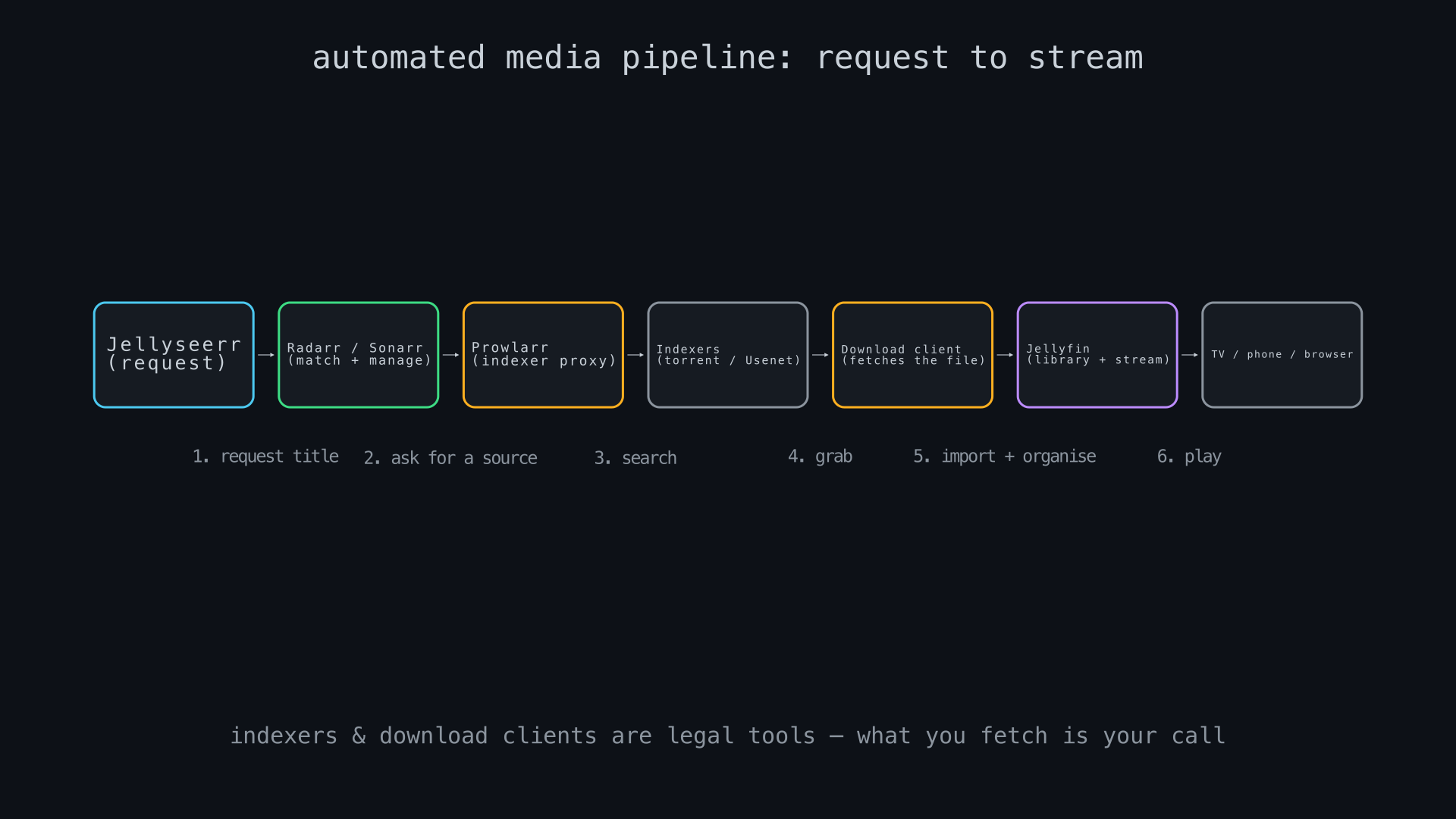
The pieces, in the order a request travels through them:
- Jellyseerr — a request front-end. Anyone with access can search for a title and ask for it, the way you would search a streaming catalogue.
- Radarr / Sonarr — the managers. They take a request, work out which specific release (resolution, source, codec) matches your quality profile, and later rename and file the finished download into your library structure.
- Prowlarr — an indexer proxy. It is a search aggregator, nothing more: it queries whichever torrent trackers or Usenet indexers you have configured and returns results to Radarr/Sonarr. Prowlarr itself never downloads a file.
- A download client (qBittorrent for torrents, SABnzbd for Usenet) — the only component in the chain that retrieves data.
- Jellyfin — scans the finished, organised files and makes them playable.
Where this sits legally is worth stating plainly rather than glossing over. Indexers, Prowlarr, and download clients are general-purpose search and transfer tools — using them is not itself against the law, in the same way owning a web browser or a BitTorrent client is not. What is illegal in most jurisdictions, including Australia, is downloading or distributing a copyrighted work without the rights holder’s permission. The stack has entirely legitimate uses that never cross that line: automating your own ripped DVD and Blu-ray collection into a browsable library, pulling Linux distribution images and other freely licensed software, archiving public-domain films and out-of-copyright television, or managing home video. What you point the indexers at is a decision the software does not make for you, and it is the one part of this build where “it’s technically possible” and “it’s legal” are genuinely different questions.
What it costs
Run the numbers on a modest, redundant build: a Synology DS225+ (~AU$585) plus two 8TB Seagate IronWolf NAS drives in RAID1, so one drive can fail without losing data. IronWolf 8TB pricing has been unusually volatile through 2026 — more on why below — with recent Australian retail and marketplace prices ranging from roughly AU$370 to over AU$500 per drive; AU$400 is a reasonable mid-range estimate. That puts the hardware at around AU$1,385 up front, plus roughly AU$65 a year in electricity at a 25W idle draw.
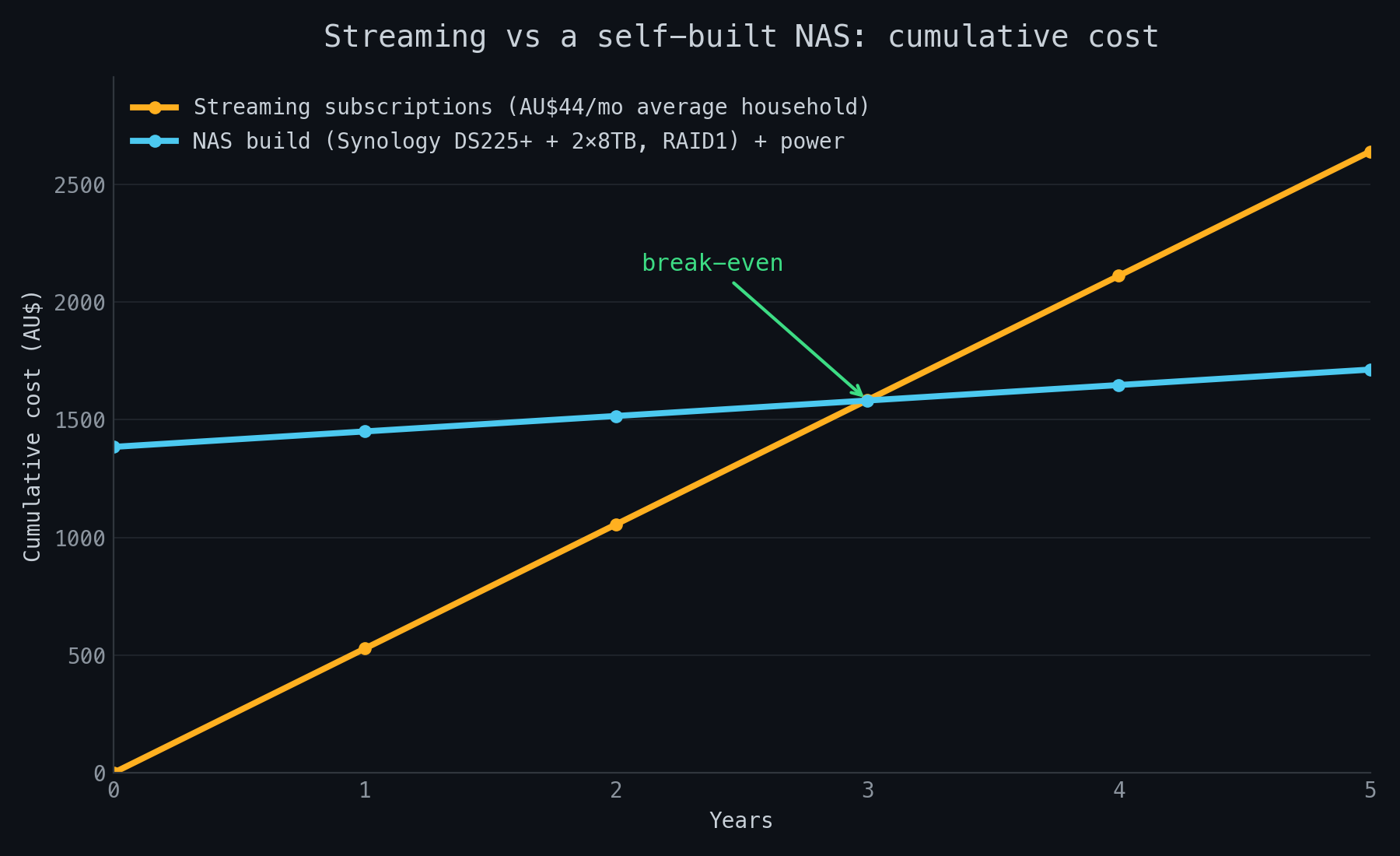
Break-even lands around the three-year mark under these assumptions, not the “pays for itself in six months” pitch NAS vendors sometimes imply. Two things push the real number around: how many streaming subscriptions a household is replacing (the AU$44 figure is an average across everything from a single Netflix tier to five-plus services), and drive prices, which have been unusually unstable through 2026 for reasons worth explaining.
2026 is a genuinely bad year to be buying hard drives, for reasons that have nothing to do with NAS builders. AI data centre construction has consumed effectively all available hard drive manufacturing capacity: Western Digital told analysts it is “pretty much sold out for calendar ’26,” with long-term supply agreements already extending into 2027 and 2028, and Seagate has confirmed its nearline capacity is fully allocated through the year too. Consumer and small-business buyers are competing for whatever capacity hyperscalers do not claim, and pricing reflects it. None of this makes a NAS build a bad idea, but it does mean the drives, not the enclosure or the CPU, are where the budget goes, and it is worth shopping around rather than assuming last year’s per-terabyte price still holds.
A practical build
Two starting points, depending on how much of the setup you want to own:
| Approach | Hardware | Rough cost | OS + apps |
|---|---|---|---|
| Prebuilt, simplest | Synology DS225+ (2-bay) + 2× 8TB NAS drive | ~AU$1,385 | DSM + Docker package for Jellyfin, *arr stack |
| DIY, more flexible | N100 Mini-ITX board (~US$120) + Jonsbo N3 case (~AU$229) + SFX PSU + RAM + 2× 8TB drive | ~AU$1,700–1,900 | TrueNAS SCALE (free) + Docker apps |
In either case, the software setup follows the same order: install the OS, create a storage pool/volume across the drives (RAID1/mirror for two drives), install Docker (built in on DSM and TrueNAS SCALE), then deploy Jellyfin, Jellyseerr, Radarr, Sonarr, Prowlarr and a download client as containers — most guides and the official Jellyfin container documentation use Docker Compose files for this, which keeps every service’s configuration in one place and makes the whole stack reproducible if the hardware ever needs replacing.
Limitations
A NAS is not a drop-in streaming replacement, and treating it as one leads to disappointment:
- No live TV or sport out of the box. The *arr stack manages files, not live streams. Sport, in particular, generally still needs a separate subscription or an antenna.
- RAID is not backup. RAID1 protects against a single drive failing; it does nothing against fire, theft, ransomware, or you deleting the wrong folder. A genuine backup needs a copy off the NAS entirely — ideally off-site.
- You are the IT department. Firmware updates, drive health monitoring, and diagnosing a service that will not start are now your job, not a vendor’s support line.
- Remote access is a real attack surface. Exposing a NAS’s web interface or Jellyfin instance directly to the internet without a VPN or reverse proxy with proper authentication is a common way home servers get compromised. Treat remote access with the same care as any other internet-facing service.
- Day-one new releases are still day-one new releases. Automation can only organise what already exists somewhere to be found; it cannot make a film available before it is out.
Sources
- Cost of streaming services in Australia 2026 — Canstar
- Plex Tripling Lifetime Plex Pass Price to $750 in July — MacRumors
- Using Hardware-Accelerated Streaming — Plex Support
- Hardware Acceleration — Jellyfin documentation
- Jellyfin container installation documentation
- Synology vs QNAP NAS 2026: Home User Guide — Newegg Insider
- New 2025 Synology disk compatibility policy — blackvoid.club
- Synology’s hard drive compatibility reversal — Yahoo Tech
- TrueNAS SCALE 24.10 Shifts from Kubernetes to Docker — Linuxiac
- New Unraid OS License Pricing — Unraid
- Prowlarr — official GitHub repository
- Build your own Alder Lake-N PC with ASRock’s Intel N100 motherboards — Liliputing
- Jonsbo N3 Mini-ITX 8-Bay NAS Case — PLE Computers (AU pricing)
- Don’t Count on HDDs to Save You From Rising Storage Costs — How-To Geek
- AI blamed again as hard drives are sold out for this year — The Register